GIS: The Secret Weapon for Low-Income Retirement in Canada
How to master the system to maximize your government benefits.
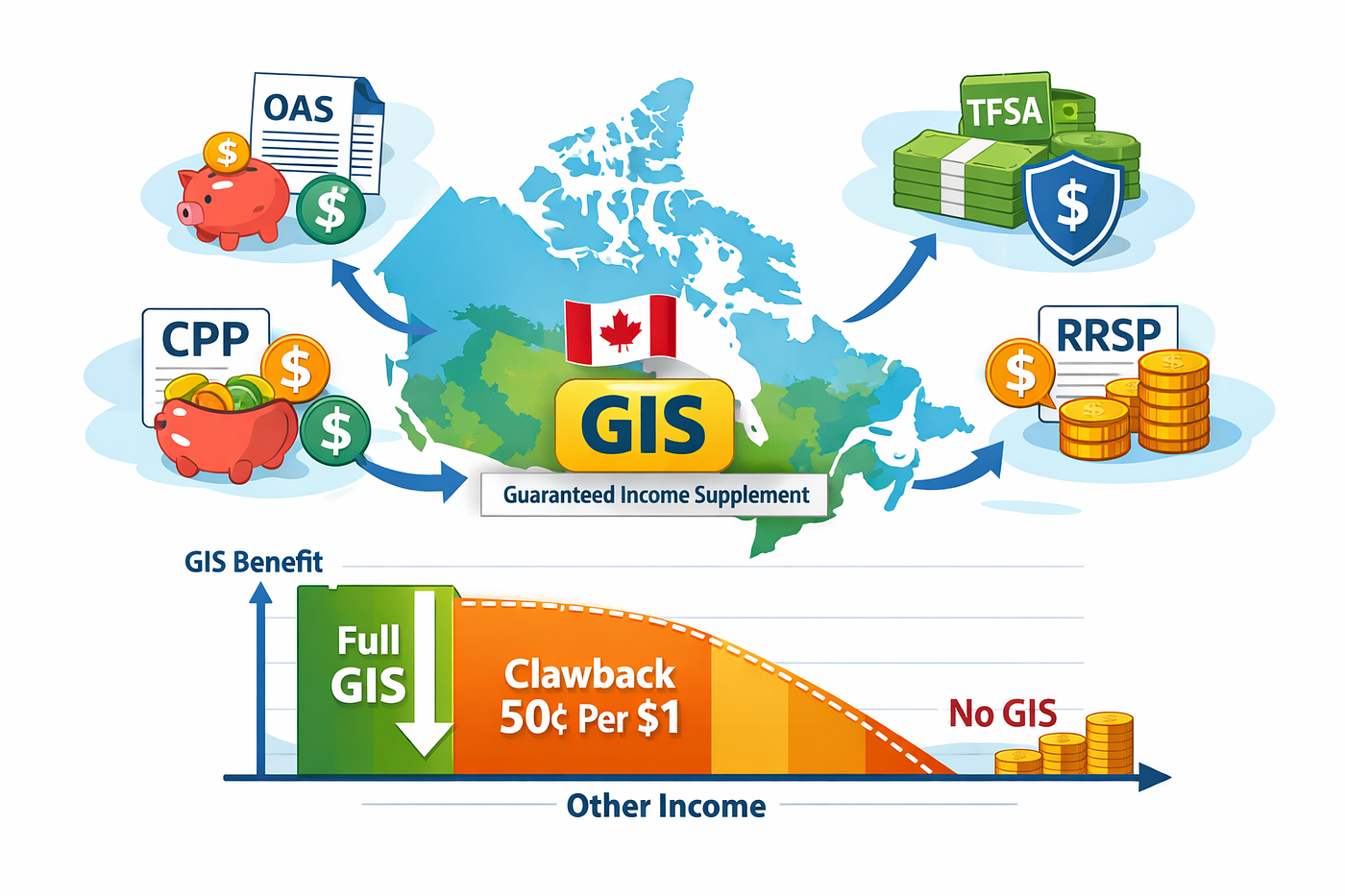
When most Canadians think about retirement, they focus on RRSPs and the Canada Pension Plan (CPP). But for many, the most powerful tool is the Guaranteed Income Supplement (GIS) — a monthly, non-taxable payment for seniors who have little to no income beyond their basic pension.
For low-income earners, the usual financial advice is flipped on its head. Because the GIS is “income-tested,” every dollar of taxable income you earn can actually trigger a 50% cut to your GIS benefits. This means your goal shouldn’t just be to save the most money; it should be to organize your finances to qualify for the maximum GIS possible.
1. The Most Important Rule: No OAS = No GIS
The Guaranteed Income Supplement (GIS) is an “add-on” benefit. You cannot receive GIS unless you are already receiving the Old Age Security (OAS) pension.
Automatic Enrollment in OAS
Some seniors are automatically enrolled in OAS.
If you are 64 years old, living in Canada, and Service Canada has sufficient information about you (such as your date of birth, address, Social Insurance Number (SIN), tax records, and residency history), you may be automatically enrolled to begin receiving OAS the month after your 65th birthday.
If you qualify for automatic enrollment, you should receive a notification letter around age 64 confirming that you do not need to apply.
Apply Early if You Are Not Automatically Enrolled
If you do not receive an automatic enrollment letter, you will need to apply for OAS.
Service Canada may send you an application package, but you do not need to wait for it. Because processing times can take several months, apply for OAS 6 to 11 months before you turn 65 to avoid delays in both OAS and GIS payments.
2. The Digital Advantage: My Service Canada Account (MSCA)
While paper applications are still accepted, using My Service Canada Account (MSCA) is now the preferred and most efficient method for most seniors.
Faster Processing:
Online applications bypass the traditional “mailroom” stage and are entered directly into the system. This typically results in a faster turnaround compared to paper submissions.
Reduced Errors:
The online portal prompts you to complete all required fields before submission, reducing the risk of incomplete applications and the frustrating back-and-forth delays that often occur with paper forms.
Real-Time Tracking:
Once submitted, you can log in anytime to check the status of your application. There’s no uncertainty about whether your paperwork was received or lost in transit.
How to Get Started:
If you don’t already have an MSCA, you can register using a Sign-In Partner (your online banking credentials from participating financial institutions). First-time users may need a Personal Access Code (PAC), which can be requested online or obtained at a local Service Canada office.
3. The “Minimum Income Floor”
A common concern for immigrants or Canadians who spent many years abroad is receiving a partial Old Age Security (OAS) pension because they lived in Canada for fewer than 40 years after age 18.
However, for low-income seniors, the Guaranteed Income Supplement (GIS) is designed to “top up” income to a minimum level.
How the Floor Works
For a single senior receiving the maximum OAS, the combined total of OAS + maximum GIS creates a guaranteed minimum income level.
As of early 2026, that combined minimum income level is approximately $1,851 per month (about $22,200 per year).
If your OAS is reduced because you receive a partial pension, your GIS may increase — provided you have little or no other taxable income — to bring your total income up toward that same floor.
In other words, for very low-income seniors, the system adjusts to protect a basic income level.
✅ Pro Tip: File Your Taxes Every Year — Even With Little or No Income
Your eligibility for the Guaranteed Income Supplement (GIS) is reassessed every year based on your previous year’s tax return.
Even if you have little or no income, always file your taxes on time. Failure to file can result in your GIS payments being delayed or suspended.
Automatic renewals only work if the government has your up-to-date income information.
4. Marital Status: The “Combined Income” Rule
A crucial detail that many seniors miss is that the Guaranteed Income Supplement (GIS) is family income-tested.
If you are married or in a common-law relationship, the government looks at your combined net income (excluding OAS) — not just your individual income.
The Spouse Impact
Even if you personally have $0 income, you may receive reduced GIS — or no GIS at all — if your spouse has significant pension income or is still working.
For 2026:
- A single senior must have a net income of approximately $22,488 or less to qualify for GIS.
- A couple where both spouses receive OAS must have a combined income below approximately $29,712.
These thresholds are indexed quarterly and may change slightly over time.
Special Situation: The “Allowance” for Spouses (Ages 60–64)
If you are 65 and receiving GIS, but your spouse is between the ages of 60 and 64, they may qualify for a related benefit called the Allowance.
Why It Exists:
Without this benefit, there would be a “poverty gap” where the younger spouse has little or no income while waiting to turn 65.
The Benefit (2026):
- Maximum Allowance: approximately $1,409.72 per month
- Combined household income must be below approximately $41,616
What Happens at 65?
Once the younger spouse turns 65:
- The Allowance stops.
- They begin receiving their own OAS, and possibly GIS, based on the couple’s combined income.
📊 2026 GIS & Allowance Income Limits (Quick Reference)

Note: All figures are indexed quarterly and may change with inflation. If you receive a partial OAS pension, your GIS may increase (subject to income limits).
5. The GIS Clawback and the “Dividend Trap”
To use the Guaranteed Income Supplement (GIS) effectively, you must understand how the government defines “income.”
GIS uses an aggressive reduction formula. For most seniors, benefits are reduced by 50 cents for every $1.00 of additional household income (excluding OAS).
This reduction applies before regular income tax is calculated, meaning the combined impact can be substantial.
What counts as income for GIS?
GIS is calculated using your prior year’s net income, excluding OAS. This includes:
- CPP/QPP benefits.
- Private pensions and employer benefits.
- Interest income
- Capital gains (taxable portion)
- Rental income
- RRSP/RRIF withdrawals
- Taxable Canadian dividends (the most misunderstood category)
⚠️ Warning: The Non-Registered Account “Dividend Trap”
If you hold dividend-paying Canadian stocks in a non-registered account, you are exposed to the dividend gross-up rule.
For tax purposes, the Canada Revenue Agency (CRA) increases (“grosses up”) eligible Canadian dividends by 38% when calculating net income.
Example:
- You receive $1,000 in actual cash dividends.
- For GIS purposes, your income is treated as $1,380.
- GIS is reduced by 50% of that amount = $690 reduction.
That means a $1,000 dividend can reduce your GIS by $690 — a very significant impact.
While you will also receive the dividend tax credit when calculating income tax, that credit does not prevent the GIS clawback because GIS is based on net income before dividend tax credits are applied.
6. Strategy: The RRSP Trap vs. the TFSA Advantage
As discussed earlier, GIS benefits are reduced as taxable income rises. That makes the type and timing of income critically important for low-income seniors.
The Winning Move: Use Your TFSA Strategically
Withdrawals from a Tax-Free Savings Account (TFSA) are not considered income for GIS purposes. They:
- Are not reported as taxable income
- Do not trigger the 50% GIS reduction
- Have zero impact on GIS calculations
The RRSP “Meltdown” Strategy
If you have modest RRSP savings and expect to qualify for GIS at age 65, consider withdrawing RRSP funds between ages 60 and 64, before GIS begins.
You may pay some tax on those withdrawals now — but by reducing or eliminating your RRSP balance before age 65, you can:
- Lower future taxable income
- Reduce future RRIF minimum withdrawals
- Potentially maximize GIS eligibility starting at 65
The goal is simple: enter age 65 with minimal taxable income beyond CPP and OAS, so you qualify for the highest possible GIS.
Adjust Assets in Your Non-Registered Account
Seniors who expect to qualify for GIS should also be cautious about holding dividend-paying investments in non-registered accounts. Because of the dividend gross-up rules, those dividends can significantly reduce GIS benefits.
If possible:
- Move dividend-producing shares or ETFs into your TFSA.
If TFSA room is limited, consider gradually repositioning your non-registered portfolio before age 65:
- Sell high-dividend stocks or ETFs
- Replace them with growth-oriented investments that reinvest earnings
- Consider tax-efficient corporate class or total-return ETFs designed to minimize taxable distributions
Like the RRSP “meltdown,” this repositioning is often best done before age 65, while GIS is not yet in play.
Strategic asset location — and income control — can dramatically improve your after-tax and after-clawback retirement income.
⚠️ Important: Manage Capital Gains Carefully
Selling dividend-producing assets may trigger capital gains tax. To avoid creating a large taxable gain in a single year — which could push you into a higher tax bracket — consider spreading sales over multiple years.
A gradual transition can:
- Smooth out capital gains
- Keep annual taxable income manageable
- Improve long-term tax and GIS outcomes
Strategic timing matters just as much as strategic asset selection.
7. The “Instant GIS” Hack (Form ISP-3041)
Normally, GIS is based on last year’s income. If you earned $60,000 last year but just retired, the government might think you are too “rich” for GIS.
- The Fix: File Form ISP-3041. This tells Service Canada to ignore last year’s job income and look at your current (lower) retirement income. This allows you to start receiving GIS the moment you stop working.
Note: The form is often not readily available online for public download; it is typically mailed to you or obtained by calling Service Canada at 1–800–277–9914.
8. The Working Senior’s Advantage
Many seniors worry that taking a part-time job or doing freelance work will “wipe out” their GIS benefits. Fortunately, the government has a built-in incentive to help you stay active in the workforce.
As of 2026, the GIS Earnings Exemption allows you to earn up to $5,000 per year from employment or self-employment with zero impact on your benefits.
It gets even better: On the next $10,000 of earnings (income between $5,000 and $15,000), only 50% is counted toward the GIS calculation.
The Math in Action: If you earn $10,000 from a part-time job:
- The first $5,000 is fully exempt.
- For the remaining $5,000, only $2,500 is counted.
- Your total “GIS-applicable” income from that job is only $2,500, even though you took home $10,000.
Employment Income vs. RRSP Withdrawals: The “Clawback Gap”
To truly understand the value of the Working Senior’s Bonus, let’s compare two ways of getting an extra $10,000 in your pocket.

The Breakdown:
- The Part-time Job: Because of the earnings exemption, the first $5,000 is ignored, and only 50% of the next $5,000 counts. Your GIS only drops by about $1,250, meaning you keep $8,750 of your $10,000 earnings.
- The RRSP Withdrawal: The government considers RRSP/RRIF withdrawals to be “other income” with no exemptions. Every dollar reduces your GIS by 50 cents. That $10,000 withdrawal triggers a $5,000 reduction in your GIS benefits. You only “net” $5,000 — and that’s before you even pay the actual income tax on the RRSP!
The Lesson: If you need extra cash while on GIS, working a few hours a week is mathematically far superior to tapping into an RRSP. This is why we recommend the “RRSP Meltdown” strategy before you turn 65.
9. Tools for Success: The Official OAS/GIS Estimator
You don’t have to guess how the strategies discussed in this article might affect your benefits. Service Canada’s official Old Age Security Benefits Estimator allows you to model different income scenarios and see how they impact your payments.
With this tool, you can:
- Estimate your monthly GIS payments based on varying income levels
- See the impact of deferring your OAS
- Understand how marital status affects total household benefits
Pro Tip: Run at least two scenarios. First, enter your current income situation. Then run it again, assuming you have implemented strategies such as an “RRSP Meltdown” or a “TFSA Pivot.”
The difference in projected monthly GIS can show you the financial impact of smarter income planning.
Note: The estimator provides projections based on the information you enter and current program rules. Actual payments may differ depending on future income, rule changes, and personal circumstances.
10. Summary Checklist
- [ ] Apply at age 64: If you aren’t auto-enrolled, use MSCA to apply online for faster results.
- [ ] Create an MSCA: Use your banking login to set up your account and track your benefits.
- [ ] Clear out Non-Registered Dividends: Move these into a TFSA to avoid the 69% “effective tax” of the dividend trap.
- [ ] File Taxes Every April: Even with $0 income, this is the only way your GIS will renew automatically in July.
- [ ] Use Form ISP-3041: If you retire mid-year, don’t wait for next year’s tax return; request a manual reassessment based on current income.
11. Conclusion: Your Retirement, Your Rules
Navigating the Canadian retirement system can feel like learning a second language — but the effort is worth it. For many seniors, the Guaranteed Income Supplement (GIS) is not just a “supplement”; it is the foundation of financial security.
Retirement planning is not only about how much you save — it is also about how you qualify.
By understanding how income is calculated, how benefits are reduced, and how timing affects eligibility, you take control of your future. Whether it’s repositioning assets into a TFSA to avoid the dividend trap or requesting a reassessment when your income drops at retirement, these steps help ensure you receive the full benefits available to you.
You’ve spent your life contributing to Canada. Now, make sure the system works for you.
Coming Soon: Real-World GIS Scenarios
Understanding the theory is the first step, but seeing it applied to real life makes all the difference.
Case Study #1: The GIS Optimization Strategy: When It Makes Sense to Empty Your RRSP Before Age 65
Additional case studies are coming soon.
Disclaimer: This article is for educational purposes only and is not financial or tax advice. Please consult a qualified tax or financial professional before making any decisions.
What are your thoughts on this post? Share your comments with us.
Stay ahead of the curve. Subscribe here to get notified whenever I publish a new guide or tool.
Share your comment or feedback. We'll get back to you as soon as we can.